
BOOKING ARRIVALS AND CHECK-IN
Venue check-in software for booking arrivals
Help staff find bookings, check arrival eligibility and record check-in. Use booking search or QR scanning, with configured checks for session timing, booking status, payment and waivers.
Check-in availability depends on booking rules and configuration. Self-service kiosk check-in is a separate option.
AT RECEPTION
Follow a clear booking check-in process
Staff booking search and QR check-in support the arrival workflow. The booking’s timing, status and requirements determine whether it is available to check in.
Find the booking
Use staff search or scan the booking QR code to identify the relevant booking.
Check eligibility
Check-in availability takes account of the booking window, slot time, booking status, waiver requirements and payment conditions.
Record check-in
Complete check-in when the booking meets the applicable rules. Repeating the same check-in action does not repeat its associated stock or kitchen release.
If a booking is not available to check in, staff should review the relevant requirements before proceeding. Manual actions depend on permissions and the supported workflow.
BEFORE CHECK-IN
Apply the requirements attached to the booking
Booking window and session
Check-in availability depends on the configured booking window and slot time. Do not assume every booking can be checked in at any time.
Booking status
The booking’s current status forms part of its eligibility. Finding a booking does not by itself mean it is available to check in.
Payment requirements
Configured payment conditions can restrict check-in. Outstanding balances need to be handled through the supported payment and reconciliation process.
Waiver requirements
Required waiver status forms part of the check-in rules. Waiver management supports templates, signatures and status checks, with permission-controlled manual actions.
STAFF CONTROL AND RECORDS
Keep arrival handling tied to the booking
Attendee register
Use the attendee register within the supported booking workflow. Guest-checkout privacy rules affect the customer information available.
Repeat check-in actions
Repeating a booking check-in does not create another check-in effect or repeat the associated stock or kitchen release. This does not establish a general re-entry policy for your venue.
Controlled manual actions
Waiver-related manual actions are permission-controlled and auditable. Confirm the authorised process for resolving an arrival issue rather than assuming every staff member can override it.
Booking check-in records are not a substitute for physical access controls or a live occupancy count. Define those operational processes separately where your venue needs them.
OPTIONAL SELF-SERVICE
Offer a kiosk check-in point where configured
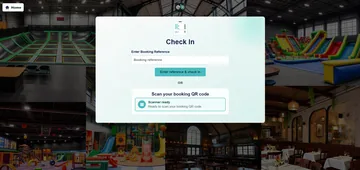
The kiosk check-in screen provides a booking-reference entry point and a QR scanner-ready state. Configured booking QR scans return a short on-screen result.
This is a separate customer-facing journey from the staff interface. Confirm the kiosk setup, scanner requirements and how customers can get assistance if they cannot complete check-in.
CONNECT THE VISIT
Plan booking, arrival and equipment together
Before the visit
Configure the activity-booking journey, customer details and checkout requirements before customers arrive.
Online booking softwareTickets and admissions
Explore ticketing and admission requirements separately. Booking QR check-in does not establish support for every ticket-redemption process.
Ticketing and admissions softwareScanning equipment
Choose compatible scanning equipment for the intended staff or kiosk setup. Confirm device suitability before selecting hardware.
Explore scannersQUESTIONS BEFORE YOU CHOOSE
Venue check-in software questions
How do staff find a booking at arrival?
Staff can use booking search or booking QR scanning. The available workflow and customer information depend on the booking and staff access.
What determines whether a booking can be checked in?
Eligibility takes account of the booking window, slot time, booking status, waiver requirements and payment conditions. The configured rules determine availability.
Can unpaid bookings or missing waivers restrict check-in?
Yes. Payment and waiver requirements can be enforced as part of the configured check-in rules. Confirm the conditions and authorised resolution process for your setup.
What happens if the same booking is scanned again?
Repeated check-in actions do not repeat the booking’s associated stock or kitchen release. This protection does not mean every venue supports unrestricted repeat entry.
Can visitors check in at a kiosk?
Booking QR check-in is available through a configured kiosk journey. The kiosk shows a short result message, and customers should have a clear way to get staff assistance when needed.
Does check-in software control gates or count everyone inside?
The booking check-in workflow described here does not establish access-gate control or live occupancy tracking. Discuss those requirements separately if your venue needs them.
SEE YOUR ARRIVAL WORKFLOW
Walk through check-in with your booking rules
Tell us how your visitors arrive and which payment, waiver and timing requirements apply. We’ll demonstrate the relevant staff and optional kiosk journeys, including how your team handles bookings that are not ready to check in.