
CUSTOMER-FACING KIOSK EQUIPMENT
Self-service kiosk hardware for your venue’s customer journeys
Plan the physical kiosk around the task customers need to complete. Consider placement, the configured software journey and any required payment or scanning equipment, then confirm the exact proposed unit and connections.
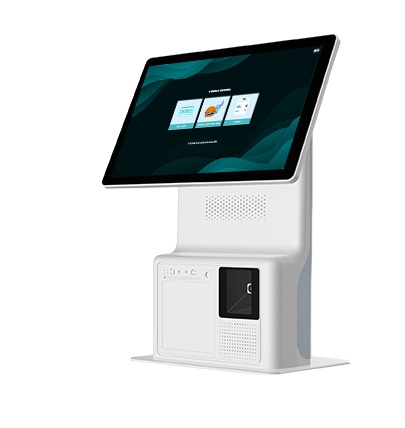
The approved photograph is a hardware reference, not a standard package. Model availability, included components and software compatibility require confirmation.
Choose the customer task before selecting the equipment
Product ordering
If customers need to browse products and place an order, demonstrate the configured ordering journey and checkout before choosing the kiosk and peripherals.
Activity purchases
Self-service activity purchase depends on the relevant modules and customer-information requirements. A purchase option on a demonstration screen does not establish a separate ticketing system.
Booking check-in
Configured kiosk booking check-in has its own scanning and customer-assistance requirements. Confirm those against the proposed equipment.
These are separate software journeys. Their availability does not establish that every pictured kiosk supports all three or includes the necessary devices.
Plan where and how customers will use the kiosk
Physical position
Check the proposed unit’s dimensions, stability and mounting or counter requirements. Do not rely on the photograph for measurements.
Customer interaction
Review screen position, reach, approach space and the available route to staff assistance. Confirm suitability for the people who will use the installation.
Power and network
Obtain the actual power and connectivity requirements for the unit and its peripherals. Do not assume a connection type from its appearance.
Staff access
Plan access for cleaning, consumables and support where applicable. Confirm the equipment’s operating and maintenance instructions.
Confirm each additional device separately
Payment equipment
A payment option in the software does not prove an integrated device connection. Confirm the terminal, connector, gateway and completed payment workflow for the proposed kiosk.
Scanning equipment
Confirm whether the intended check-in journey needs a scanner and which device is compatible. Test the code formats and presentation method customers will use.
Printing requirements
If the journey requires printed output, confirm the document, printer and connection involved. A kiosk photograph does not establish an included printer or ticket-printing function.
Demonstrate the complete proposed installation
Review the hardware, enabled software and peripherals together. Walk through the customer’s task and confirm what staff should do if a payment, scan or connection does not complete.
Ask how a session ends and what remains on screen for the next customer. Automatic reset, remote management and unattended recovery should be demonstrated rather than assumed.
Equipment list
Obtain the exact model, variant, included components and optional accessories in the quotation.
Supported journeys
Identify which software modules and customer workflows are enabled on that equipment.
Supply and service terms
Confirm the applicable installation, warranty, training and support arrangements. Rental or finance options require current offer confirmation.
Self-service kiosk hardware questions
Does the pictured kiosk include payment, printing and scanning devices?
The photograph does not establish the included components. Confirm the exact unit and any peripherals in the proposed quotation.
Can one kiosk support ordering, activity purchases and check-in?
Available combinations depend on the equipment, enabled modules and configuration. Demonstrate the combination you need rather than assuming every kiosk supports every journey.
Is the kiosk suitable for unattended use?
That requires confirmation of the complete installation and operating process. Check session reset, interrupted transactions and staff-assistance arrangements before relying on unattended operation.
What model, connectivity and warranty are available?
Those details must be confirmed for the current proposed unit. The reference photograph does not establish specifications, stock availability or service terms.
Show us the self-service task your venue needs
Tell us where the kiosk will be used and what customers should complete. We’ll discuss the equipment requirements and confirm the software, peripherals and support arrangements for the proposed setup.