
ORDER AT THE TABLE
Online food ordering for table-service venues
Give customers a table-linked route to browse products, place an order and pay on their own device where QR table ordering is enabled.
The demonstrated route starts from a valid table token. Remote collection or delivery ordering is not established by this example.
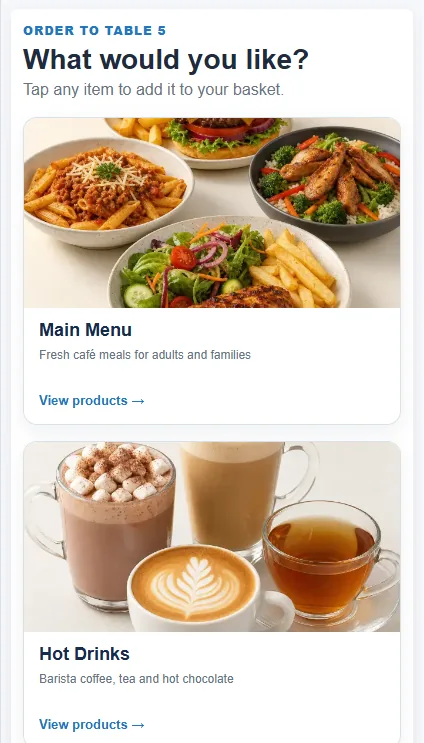
How the configured journey works
Start at the table
A venue-provided QR code opens the configured table-order journey. The table token identifies the table for that order.
Choose and pay
Customers select eligible products, add any available notes and complete the configured payment step.
Hand off the order
The resulting order is available to staff. Eligible preparation items can follow the location's configured kitchen workflow.
Keep the table and the order together
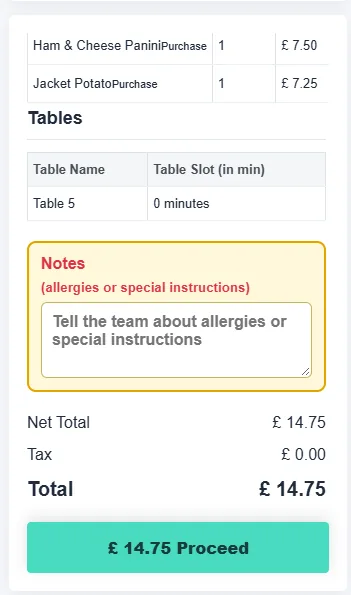
The supplied order summary shows a table name, selected products, notes and a total. These are the details staff can use to prepare and serve the order.
A successful table order can trigger kitchen printing when that route and printer are configured. The exact printer and print output should be checked for the venue.
What to confirm for your venue
- A live QR code must point to an active table token; a decorative or random code would not create an order.
- Confirm which products, payment methods and preparation routes are enabled at the location.
- Collection, delivery and marketplace orders require their own demonstrated customer journey.
Common questions
Can a customer order from the table?
Yes, where QR table ordering and an active table token are configured. The customer can browse eligible products and complete the available payment journey.
Does every order print automatically in the kitchen?
Configured table orders can print in the kitchen after successful payment. Confirm the printer, order eligibility and output in the proposed setup.
Is this a delivery or collection checkout?
This page demonstrates table-linked ordering. A separate remote collection or delivery journey has not been established here.
Review the setup that fits your venue
Tell us the journey, equipment and staff actions you need. We will demonstrate the relevant configuration and confirm any model-specific or service terms.