
KITCHEN HARDWARE
Kitchen Display Hardware
Pair the evidenced KDS software workflow with a suitable physical screen supplied through EPOS Bookings or a partner, according to the venue setup.
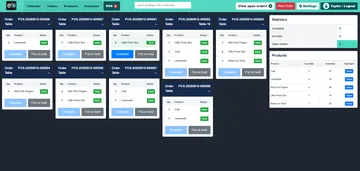
The genuine queue image shows software, not the supplied monitor. Display model, mounting, power, network and environment suitability are confirmed separately.
How the configured journey works
Review the queue
The KDS software shows eligible preparation orders and status controls for configured food workflows.
Choose hardware
Physical displays can be offered directly or through partners. Select the actual screen and mounting arrangement for the kitchen.
Test on site
Verify display legibility, power, network, input method and the order feed in the proposed working position.
Software evidence and device evidence are different
A physical kitchen display is part of the available offer, while the genuine screenshot proves the queue interface. Neither identifies a single model or universal environmental rating.
A display page should help a venue choose and test hardware. KDS order status and queue detail remain on the dedicated software page.
What to confirm for your business
- Confirm the exact display model, supplier, accessories and warranty/support terms.
- Check input, mounting, cleaning, heat, grease and moisture requirements for the installation.
- Demonstrate one eligible order reaching the chosen screen before installation claims.
Common questions
Do you offer a physical KDS display?
Physical displays are offered directly or through partners. The exact unit is proposed for each venue.
Is the screenshot the hardware model?
No. It is a genuine KDS software queue capture; the screen hardware requires its own specification.
Can any screen be used?
Compatibility, operating system/browser, input and kitchen environment must be checked for the proposed device.
Review the setup that fits your business
Tell us the journey, equipment and staff actions you need. We will demonstrate the relevant configuration and confirm any model-specific or service terms.