
LIVE EVENTS
Concert Booking & POS Software
Represent an event as a configured bookable activity, give customers a booking journey and let staff review and check in the group at arrival.
This route uses one booking for a group, not separate tickets for each person. The group must arrive together for this route; seating and re-entry are not promised.

How the configured journey works
Set up the event
Configure the event activity, session, attendee categories and available places for the selected venue.
Book as a group
A customer completes the booking for the party and receives the configured booking details and reference.
Arrive together
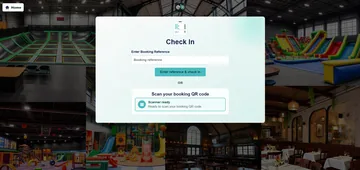
Staff use the configured lookup or QR check-in for the group booking; all attendees in that booking need to arrive together under this workflow.
Keep the event promise specific
This page does not offer individual transferable tickets, separate arrival for one member of a group, reserved seating or automatic re-entry. Those would need a different demonstrated product journey.
Counter POS can support configured merchandise or food and drink sales. Door sales of the same admission should be confirmed for the event setup rather than assumed from generic POS capability.
What to confirm for your business
- Demonstrate a fictional group booking and a single group arrival check.
- Clarify what staff do if one guest arrives late or a booking reference is scanned again.
- Confirm whether door sales are offered for the same configured event; do not imply allocated seating or cashless wristbands.
Compare plans for your business
Review the included features and confirm any hardware or additional services required for your setup. Trials last one calendar month and require verification and approval. Review the Direct Debit setup and billing dates during registration.
Compare the full plan features
Every price is per location. Choose monthly or yearly billing, then select the plan that fits your operation.
Swipe or scroll the comparison sideways to view every plan.
| Included plan modules | Basic£49.99per location / monthBilled monthly | Standard£79.99per location / monthBilled monthly | Premium£99.99per location / monthBilled monthly | Scale£199per location / monthBilled monthly |
|---|---|---|---|---|
| Plan allowances | ||||
| Locations included | 1 location | 1 location | 1 location | 1 location |
| Staff users | 3 | 6 | Unlimited | Unlimited |
| Activity calendars (where configured) | 3 | 6 | Unlimited | Unlimited |
| Current plan modules | ||||
| Inventory Management | ✓ | ✓ | ✓ | ✓ |
| EPOS Software | ✓ | ✓ | ✓ | ✓ |
| Kitchen Printer automation | ✓ | ✓ | ✓ | ✓ |
| Table Management | ✓ | ✓ | ✓ | ✓ |
| Online Bookings /Reservations | ✓ | ✓ | ✓ | ✓ |
| QR Code Table orders | — | ✓ | ✓ | ✓ |
| KDS (Kitchen Display System) | — | — | ✓ | ✓ |
| Self-serve Kiosk Module | — | — | ✓ | ✓ |
| Core workflows and setup | ||||
| Suppliers and purchase orders | ✓ | ✓ | ✓ | ✓ |
| Session capacity and availability | ✓ | ✓ | ✓ | ✓ |
| Party and group bookings | ✓ | ✓ | ✓ | ✓ |
| Booking-based admissions | ✓ | ✓ | ✓ | ✓ |
| Venue check-in by reference or QR | ✓ | ✓ | ✓ | ✓ |
| Appointment requirements (discussed for the setup) | ✓ | ✓ | ✓ | ✓ |
| POS open orders and balances | ✓ | ✓ | ✓ | ✓ |
| Products and menu management | ✓ | ✓ | ✓ | ✓ |
| Online table reservations (where configured) | ✓ | ✓ | ✓ | ✓ |
| Staff roles and configuration | ✓ | ✓ | ✓ | ✓ |
| Booking communications | ✓ | ✓ | ✓ | ✓ |
| Operations and growth | ||||
| Operational reporting and dashboard | ✓ | ✓ | ✓ | ✓ |
| Multiple-location configuration (locations priced separately) | — | — | ✓ | ✓ |
| Customer accounts and visit history | ✓ | ✓ | ✓ | ✓ |
| Membership management (billing setup required for paid plans) | — | — | ✓ | ✓ |
| Loyalty points and rewards | — | — | ✓ | ✓ |
| Customer email campaigns (configured consent required) | — | — | — | ✓ |
| Session color coding for wristband workflow | — | — | — | ✓ |
| Session announcements (configured) | — | — | — | ✓ |
| equipment rental (where applicable) | — | — | — | ✓ |
| Choose your plan | ||||
Each additional location is priced separately; ask about a possible multi-location discount. Plan eligibility still depends on the relevant configured workflow and the offered setup. Appointment requirements are discussed rather than a promise of dedicated appointment booking. Confirm the customer-facing reservation journey, equipment, printer connection, paid membership billing, payment processing, support and contract terms in a written quote. Trials require verification and approval.
Common questions
Does each attendee receive a separate ticket?
No. The current route uses one group booking, and the group must arrive together.
Can a late guest use the same booking separately?
Separate partial-group arrival is not confirmed by this workflow. Agree the venue procedure before selling the event.
Can we sell merchandise or refreshments?
Configured POS products can support eligible on-site sales; choose the categories and payment setup for the venue.
Review the setup that fits your business
Tell us the journey, equipment and staff actions you need. We will demonstrate the relevant configuration and confirm any model-specific or service terms.