
PRODUCT Catalog CONFIGURATION
Product & Menu Management Software
Organize the products your venue sells with product records, categories and configured prices. Review how that catalog is used in your enabled sales channels.
Here, menu management means configuring the sellable product catalog. Specialist requirements such as modifiers, scheduled specials and recipe costing need separate confirmation.
Build the catalog around your products
Product records
Maintain product codes or SKUs, names, descriptions, units and location assignments. Product records can also hold an image and configured price, cost, tax and discount fields.
Categories and subcategories
Organize products into categories and subcategories. Categories can have their own descriptions, images and location assignments.
Prices and tax settings
Configure net prices, discounts, tax and cost fields. Tax may inherit the location’s configured rate. Confirm how these settings apply to your products before using them for sales.
Separate catalog setup from selling
Staff POS presents eligible categories and products as selectable cards for building an order. What is available depends on the configured location and channel.
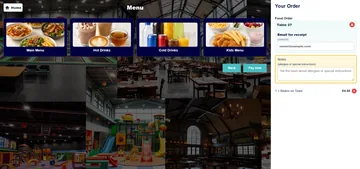
The customer-facing kiosk is a separate selling interface. The example below shows product browsing and an order summary; it does not show the administration tools used to edit the catalog.
Check how the catalog reaches each channel
Shared catalog source
POS, widget and kiosk interfaces draw on shared category, product, price and stock data, subject to location and product availability. This does not mean every product is available in every channel.
Changes and availability
Ask us to demonstrate how an edited product or price becomes visible in your chosen setup. Publication steps, refresh timing and the presentation of unavailable products need confirmation; instant updates and automatic sold-out displays should not be assumed.
If customers will order from a table QR code, review that customer journey separately from catalog configuration.
Connect the catalog to separate operational tasks
Product stock
A product record is the starting point for its configured stock information. Stock adjustments, physical counts, supplier orders and goods receipt are separate management tasks.
Kitchen preparation
Eligible QR table-order items can reach KDS at a KDS-enabled location. Editing a product or category does not itself send a kitchen order or establish a physical printing route.
Bring these catalog questions to your demonstration
- What needs its own product record?Bring examples of your products and any required choices. Confirm how those choices are represented rather than assuming modifier groups, sizes or substitutions.
- How should products be organized?Review categories, subcategories and location assignments against how staff and customers will browse.
- Which prices and tax settings apply?Check the configured price, discount and tax fields. Demonstrate any special pricing requirement separately.
- Where should changes appear?Test the enabled sales channels, update timing and unavailable-product behaviour using your intended configuration.
EPOS menu management questions
What does menu management cover here?
It covers configured product records, categories, subcategories and price-related fields used by the selling interfaces. It does not establish a separate menu-design, digital-signage or recipe-costing tool.
Can products have images and categories?
Product records support images and category assignment. Categories and subcategories can also hold descriptions, images and location assignments. Which products appear in a selling interface depends on its configured eligibility.
Does this include sizes, modifiers or meal deals?
Those workflows are not established by the catalog functions described here. Show us the choices or combinations you need so their representation can be demonstrated before they are included in your setup.
Will a price change appear everywhere immediately?
Shared catalog data does not establish immediate updates across every device or channel. Confirm the applicable location, channel and refresh behaviour in a demonstration.
Does changing the menu update kitchen orders?
Catalog editing and order preparation are separate tasks. Eligible orders can enter a configured KDS workflow, but automatic changes to existing kitchen tickets and physical printer routing are not established by menu editing.
Review your product catalog
Bring a sample product list, category structure and the sales channels you intend to use. We can review the supported configuration and identify any specialist requirements that need demonstration.