
ACTIVITY AND SESSION BOOKINGS
Online Activity Booking Software
Let customers choose an activity, select their attendees and book an available session. Configure schedules, prices and capacity around your operation, with online checkout and booking management options that depend on your setup.
Online booking requires the relevant configuration. Payment, guest checkout and waiver requirements affect the customer journey.

FROM ACTIVITY TO BOOKING
Give customers a clear route to their session
Where enabled, the public booking widget can be embedded in your website. Its configured journey guides customers through the activity, attendee and session choices available to them.
Choose a location and activity
Customers select from the locations and activities available through your booking setup.
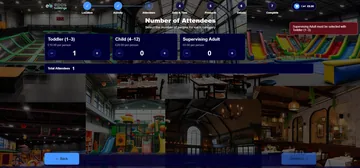
Select attendees
Customers choose attendee categories and quantities, with the relevant prices shown during the journey.
Pick a date and session
Customers select an available date and time slot. Multi-slot selection can be offered where configured.
Complete checkout
Customers provide the required details, including an email address for confirmation. Where online prepayment is configured, they continue to hosted payment.
A payment attempt is not the same as a confirmed paid booking. Payment confirmation can arrive after the customer leaves the hosted checkout.

CONFIGURE YOUR ACTIVITIES
Build sessions around your timetable and capacity
Set up each activity’s schedule and booking rules, then use the staff calendar to review bookings and remaining availability.
Timetables and breaks
Configure activity duration, sales-date ranges, weekly availability windows and breaks.
Attendee categories and prices
Set attendee categories and their prices. Date-specific price adjustments can support different pricing on selected dates.
Capacity and booking limits
Configure guest capacity and booking-count limits. These are separate controls: one limits attendees, while the other limits the number of bookings.
Multiple sessions
Enable multi-slot selection and associated discounts where appropriate for the activity and configuration.
CUSTOMER DETAILS AND PAYMENT
Match checkout to the information your activity needs
Guest checkout
Guest checkout is available for configured activities. It cannot be used when a waiver is required, and an email address is still required for confirmation.
Waiver requirements
Activities that require a waiver need the appropriate customer journey. Confirm the attendee information and waiver steps before enabling bookings.
Online prepayment
Hosted online payment requires a configured gateway and valid credentials. Booking and payment status depend on the payment result, including confirmation received after checkout.
AFTER THE BOOKING
Keep bookings visible to customers and staff
Booking confirmation
A confirmation email can be sent when configured. The journey also supports an account link and token-based booking management, subject to the booking’s status and settings.
Staff calendar
Staff can review bookings and remaining availability in daily, weekly or monthly calendar views. Slot-move tools support booking changes within the available rules.
Cancellation handling
Customer booking management depends on cancellation settings, payment state and booking status. Financial handling varies with those conditions; cancelling a booking does not promise an automatic refund.
Plan the arrival process alongside the booking journey. Check-in and admissions have their own controls and configuration.
QUESTIONS BEFORE YOU CHOOSE
Online activity booking questions
Can I add the booking journey to my website?
Yes. A public booking widget can be embedded using an iframe where enabled. Confirm the locations, activities and checkout configuration that should be available through it.
Can activities have different schedules and attendee prices?
Yes. Activities can use configured durations, availability windows and breaks, alongside attendee categories and prices. Date-specific price adjustments are also supported.
Can customers book more than one time slot?
Multi-slot selection is available where configured. Associated discounts can also be configured; confirm the options that apply to your activity.
Can customers book without creating an account?
Guest checkout is available for configured activities, but cannot be used when a waiver is required. Customers must still provide an email address for confirmation.
Can customers pay online?
Yes, where hosted online payment is configured with the required gateway credentials. Confirmation of a paid booking depends on the payment result, which can be received after checkout.
Can customers change or cancel their booking?
Token-based booking management is available subject to the booking’s status and configured rules. The actions available to customers depend on cancellation and payment conditions. Staff also have slot-move tools. Do not assume every booking can be changed or that cancellation automatically produces a refund.
SEE YOUR BOOKING JOURNEY
Walk through an activity booking with us
Tell us about your activities, attendee categories and session rules. We’ll demonstrate the relevant customer journey and confirm the scheduling, checkout and booking-management options for your venue.