
SELF-SERVICE KIOSK SOFTWARE
Self-Service Kiosk Software
Give customers a dedicated place to order products, purchase activities or check in for an existing booking. Choose the kiosk journeys that fit your venue, with the relevant modules, customer details and equipment configured for each task.
Available journeys depend on your location, enabled modules and setup. Payment devices, scanners and printers are confirmed separately.
START WITH THE CUSTOMER’S TASK
Choose the journeys your kiosk needs
A kiosk can serve different purposes within the same venue. Decide which tasks customers should complete themselves, then confirm the available screens and configuration for each journey.
Product ordering
Let customers browse the configured product menu and use the ordering and checkout options available for your setup.
Activity purchases
Offer self-service activity purchases where the required location and kiosk modules are enabled.
Booking check-in
Provide a check-in point for existing bookings, with booking QR scanning and the relevant check-in rules configured.
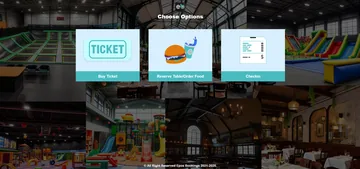
Start-screen labels and available options should reflect the journeys enabled for your installation. An option shown in a demonstration does not mean every kiosk includes that function.
PRODUCT ORDERING
Give customers a dedicated ordering point
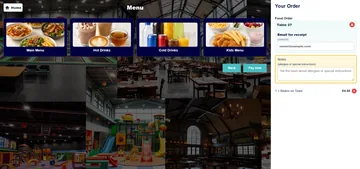
Customers can browse food categories through the kiosk product menu. The supplied demonstration also shows a table reference, an optional email field for a receipt and a Pay now action.
Confirm the complete journey for your venue, including product selection, any table-selection step, checkout and how staff receive the order. Payment equipment and the point at which preparation begins depend on the configured setup.
A kiosk ordering screen is separate from mobile QR table ordering. Do not assume the two journeys have identical checkout requirements or payment options.
SELF-SERVICE ACTIVITY PURCHASES
Match the purchase journey to your booking requirements
Self-service activity purchases require the relevant location and kiosk modules. Configure the customer information and any waiver requirements around the activity being purchased.
Customer details
Reduced-detail checkout is available only for suitable configurations. It cannot be used when a waiver is required.
Waiver requirements
Where waiver signing is configured, a waiver template is required. Signing records the signer and the attendees covered by the waiver.
Purchase and hire options have their own configuration and customer or contact requirements. Confirm the exact journey you need rather than assuming every activity or hire rate uses the same checkout.
EXISTING BOOKING ARRIVALS
Provide a clear booking check-in point
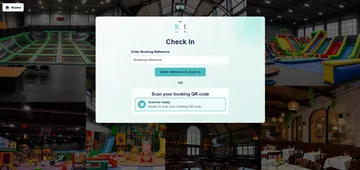
The kiosk check-in screen provides a booking-reference entry point and a QR scanner-ready state. With booking QR check-in configured, customers can scan their booking code and receive a short on-screen result.
Repeating the same booking scan does not repeat the check-in or its associated kitchen release. Where eligible booked products are linked to preparation, the release follows the configured booking and kitchen workflow.
Booking check-in does not establish support for every ticket-redemption or restaurant-reservation journey. Confirm those requirements separately.
PLAN THE COMPLETE INSTALLATION
Bring the software journey and equipment together
Choose the customer tasks first, then confirm the modules, equipment and operating process needed to support them.
Define the journeys
Identify whether the kiosk will handle product ordering, activity purchases, existing-booking check-in or a combination of configured tasks.
Confirm the requirements
Check customer details, waiver rules, payment arrangements and the booking or order handover for each journey.
Select compatible equipment
Confirm the touchscreen and any payment terminal, printer or scanner required for the installation. Decide where customers can get staff assistance when needed.
QUESTIONS BEFORE YOU CHOOSE
Self-service kiosk software questions
Can one kiosk offer more than one journey?
The demonstration start screen shows multiple options. The journeys available at your venue depend on the enabled modules and configuration; confirm the combination you need during your demonstration.
Can customers order food through the kiosk?
The kiosk product-menu demonstration shows food categories and a checkout action. Confirm the supported ordering, table-selection and payment steps for your setup, including how staff receive the order.
Can customers purchase activities at a kiosk?
Yes, where the required location and kiosk modules are enabled. Customer-information and waiver requirements affect the available purchase journey.
Can customers check in using a booking QR code?
Booking QR check-in is supported when configured. A repeated scan does not repeat the booking check-in or its associated kitchen release.
Can the kiosk use a checkout with fewer customer details?
Reduced-detail checkout is available for suitable configurations, but it cannot be used where a waiver is required. Other purchase and hire journeys may also have customer or contact requirements.
Are payment devices, scanners and printers included?
Equipment depends on your chosen installation and quotation. Confirm compatible devices and the software configuration together; not every kiosk requires or includes the same equipment.
SEE YOUR KIOSK JOURNEY
Walk through the tasks your customers need to complete
Tell us what customers should be able to do at your kiosk. We’ll demonstrate the relevant journeys and confirm the modules, customer requirements and equipment for your venue.