
EPOS software for UK hospitality and leisure
POS Software for Hospitality & Recreation
Choose point of sale software and booking tools around the way your venue works. EPOS Bookings brings counter sales, table orders, activity bookings and customer arrivals together with stock, memberships and reporting.
Available modules, payment services and device connections depend on your plan and configuration. We will confirm the setup for your venue.

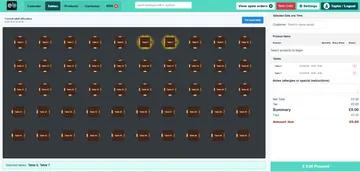
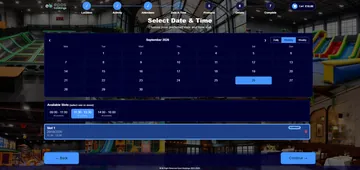
Point of sale software for counter, table and kitchen service
Start with the way customers order. Choose EPOS till software, table tools and kitchen workflows that fit your service, then connect them to the payment methods and devices configured for your venue.
POS sales and open orders
Browse product categories, scan barcodes and build a sale. Add items to eligible open orders, follow the balance due and take payment using the methods enabled for your venue.
See the sales workflowTable management
Work with a visual table plan, table capacities and reservation durations. Allocate available tables to customers or bookings and keep table-linked orders associated with the visit.
Explore table managementOnline table reservations
Let customers reserve available tables through the configured booking journey. Set booking windows and durations around the tables and places your venue makes available.
Explore online reservationsQR code table ordering
Let customers open a table-linked menu and place an order. Eligible preparation items can flow to the configured kitchen display.
Explore QR table orderingKitchen display software
Give the kitchen a view of preparation tickets and item status. Track preparation through completion, including eligible activity-linked orders released at check-in.
Explore kitchen display softwareSelf-service kiosk software
Offer the activity purchases, booking check-in, product sales or hire journeys configured for your venue. Choose which routes customers can use at the kiosk.
Explore kiosk softwareProduct and menu management
Organize categories, product images and prices. Maintain the catalog used by the relevant POS, kiosk and table-ordering channels, with availability configured for the location.
Explore menu managementFollow an order from selection to payment
At the counter, a member of staff selects the products and builds the order. Where the service uses tables, the order can be associated with the relevant table. Eligible preparation items appear in the configured kitchen workflow. Staff can add items to an eligible open order, review the amount due and take payment through the enabled method.
Part payments and outstanding balances do not imply split-by-item bills or every combination of payment methods. Ask us to demonstrate the checkout workflow you need.
Booking software for sessions, reservations and arrival
Set up what customers can book, when they can attend and how staff check them in. Choose the admission and session tools your activities need.
Online bookings and calendars
Let customers choose a location, activity, attendee categories and available dates or sessions. Staff can also create bookings through the POS calendar.
Explore online bookingsCapacity and session availability
Set guest capacity, booking limits and operating windows for activities. Review the available places in each session as bookings are made.
Explore capacity managementParty and group bookings
Set group-size limits and attendee categories. Offer configured tables, products or hire alongside the activity booking where they suit the visit.
Explore party and group bookingsBooking-based admission
Sell places for activities and timed events, then use the booking record to manage attendance and admission.
Explore booking-based admissionsVisitor check-in
Find a booking by reference or QR code. Check timing, payment and any required waiver before admitting the customer.
Explore venue check-inDigital waiver management
Collect required attendee details and signatures for activities that use waivers. Required waivers use an identified-attendee journey rather than guest checkout.
Explore digital waiversSession and wristband management
Assign named colors to activity sessions to support your team’s physical wristband process. Staff issue the corresponding wristbands at the venue.
Explore session and wristband managementSession announcements
Configure voice announcements around session end times to help your team communicate with the relevant groups.
Explore session announcementsAppointment requirements
Tell us about the service, staff and resource scheduling you need. A dedicated appointment workflow requires confirmation in a demonstration.
Discuss appointment requirementsGuest checkout is available only for activities configured without required waivers. Specialist staff or resource scheduling must be checked for your proposed setup.
EPOS back office tools for your daily operation
Use the management tools behind each visit: products, purchasing, hire, customer benefits and reports. Access depends on the modules, staff permissions and configuration enabled for your business.
Stock control and purchasing
Maintain product stock, review low-stock alerts and record inventory counts or adjustments. Manage suppliers, prepare purchase orders and record received goods against inventory.
Explore stock and purchasingEquipment rental
Offer hourly or daily hire and record equipment issued, returned, lost or extended. Standalone hire requires a customer account.
Explore equipment rental softwareReporting and operational dashboard
Review sales, bookings, visits, payments and stock for a selected period. Follow location-level operational alerts and export the reports available to your role and plan.
Explore EPOS reportingCustomer accounts and visit history
Find customer details alongside their bookings, orders, memberships and loyalty information. Invite customers to register for an account where the journey requires one.
Discuss customer workflowsMembership management
Create free or paid memberships with eligible activity and product benefits. Paid membership plans require billing setup and a connected GoCardless account.
Explore membership managementLoyalty points and rewards
Configure earning and redemption rules for eligible purchases. Review the history of points awarded and adjusted.
Explore EPOS loyaltyCustomer emails and campaigns
Send configured booking communications and campaigns to eligible subscribers. Configure birthday or milestone messages and respect opt-outs throughout.
Explore customer email toolsMultiple locations
Maintain location-specific activities, sales channels, capacity and operating settings. Review the operational information for the relevant venue.
Explore multiple locationsStaff access and configuration
Give staff access to the modules and actions their roles require. Configure booking rules and customer-facing communications around your operation.
Discuss your software configurationMatch the software to your devices and payments
Software provides the functions your team uses. Compatible terminals, scanners, printers and kitchen displays provide the physical setup. Payment services require the relevant provider, account and device configuration.
Tell us what you already use and which tasks you want to support. We will review the modules, connections and configuration before you choose a setup.
See how the tools fit your business
A restaurant, soft play center and venue shop use different combinations of the same tools. Explore a workflow relevant to your business.
Your questions answered
Frequently asked questions
What is included in EPOS software?
EPOS Bookings offers tools for sales, bookings, tables, kitchen orders, stock, customer benefits and reporting. The functions available to your business depend on your chosen modules, plan and configuration. Confirm what is included in your proposal.
Can booking software work with our website?
The booking widget can run as a customer booking journey or be embedded in a website that permits it. Available locations, activities, imagery and booking steps depend on your configuration.
Can we use our existing EPOS equipment?
Tell us the equipment models and connections you use. Compatibility must be checked against the software, connector and payment-provider configuration before existing devices are confirmed for your setup.
Can customers book without an account?
Guest checkout is available for activities configured to allow it. Activities requiring waivers use an identified-attendee journey, with guest checkout disabled so the required details and signatures can be collected.
Can we offer paid memberships?
Free and paid memberships can be configured with eligible benefits. Paid plans require billing settings and a connected GoCardless account. Confirm the billing and membership journey during your demonstration.
Can you demonstrate the tools for our venue?
Yes. Tell us what customers book, buy and hire, and how your staff work. We can demonstrate the relevant workflows and discuss configuration, equipment and any specialist requirements.
See the software working for your venue
Tell us about your sales, bookings and day-to-day tasks. We will walk through the relevant modules and discuss the setup your team needs.